The weekly spelling test, marked for you.
Set your list once. SpellCast reads each word aloud, gives every child one go, marks it, and fills in the score grid. No books to collect, no red pen.
Between tests your pupils practise independently in the app, where the words each child keeps getting wrong come back until they stick, so more of them pass next week. Free for your whole class.
Free for your class · no card · no child names to upload · ready in minutes.
Year group you teach

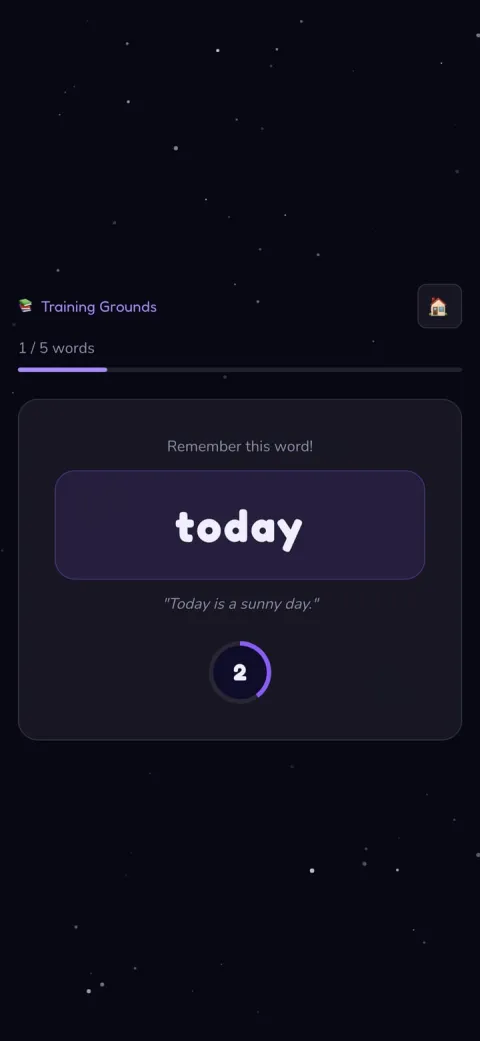
Spell as many as you can.
↓ click to start the challenge
Sound on: the word and an example sentence play automatically
Tick one box. The test runs itself.
Turn on Run a weekly test and on test day the app reads the words aloud, gives each child a single attempt, marks every answer, and lays the scores out on one screen, so you can see trends and dips at a glance. Prefer paper? Type the marks in instead and still get the picture over time.
- Reads each word aloud, so children sit it independently
- One attempt, locked on start, just like the real thing
- Marked and tracked for you, week on week
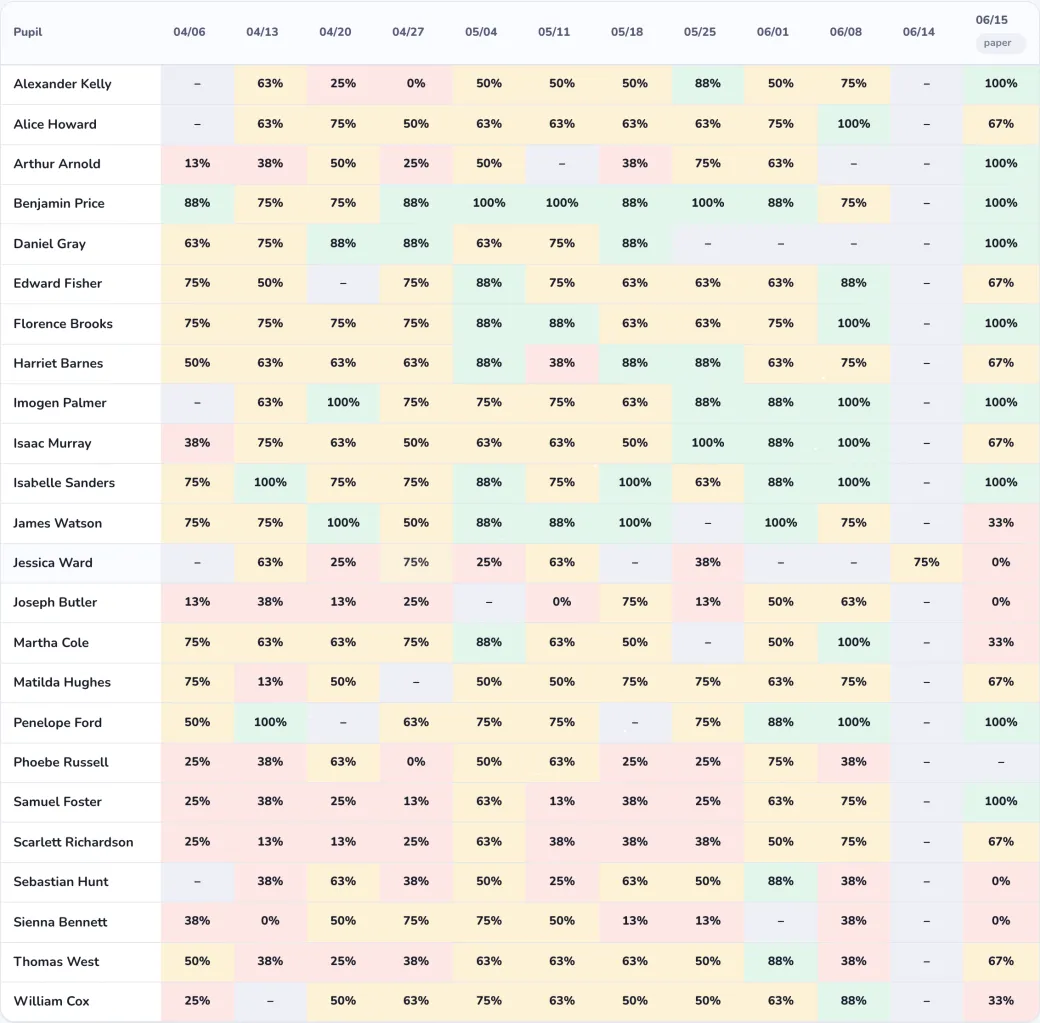
Watch · 90 seconds
From a child practising to the words your class is stuck on, with nothing for you to mark. Sound on.
Why more of them pass
The test shows you who’s stuck. The practice does something about it: between tests, children spell from memory, and the words they keep getting wrong come back more often, until they stick. Four ways to practise, all reading every word aloud.

The Challenge
Hear a word, spell it from memory, in batches of 5 or 10. The everyday practice.

Learning
For new or tricky words: shown, hidden, then spelled. Look, cover, write, check.

Spell Sprint
A timed run that builds speed once a word is known. Off by default.
Spell Ladder
Keep spelling until you slip. One more rung is always the pull.
406 pupils at 34 schools, July to October 2026, comparing each pupil’s first try at a word that week with their weekly test.
Practice they choose to come back to.
Every session earns spell points. Children spend them on companions and hatch eggs, building a collection that only grows by practising. No leaderboards, and the everyday practice has no timer, so the pupils who usually opt out of spelling don't here.





What parents and pupils say
From reviews on the App Store.
This is such a well thought through app! My son loves all the different modes, especially defeating the villains. The wizard costumes and pet companions really spur him on to keep spelling and earn coins. Top notch!
It's so good because you can get points and upgrade your outfit! In class you can do it a lot and try to be the best in the class. It's just THE ABSOLUTE BEST!
You can tell it's made with parents and children in mind — clever things like sharing weekly spelling lists, plus battles and incentives that keep it interesting, but with natural stopping points rather than a game that never ends. Very pleased!
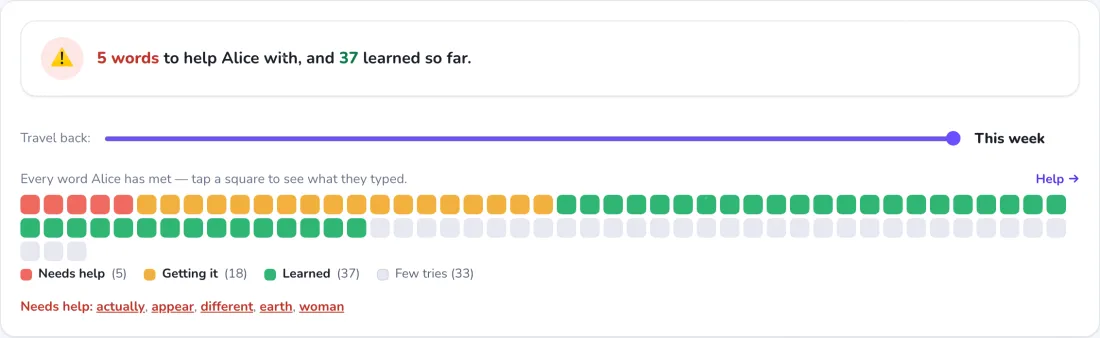
One view. It marks itself.
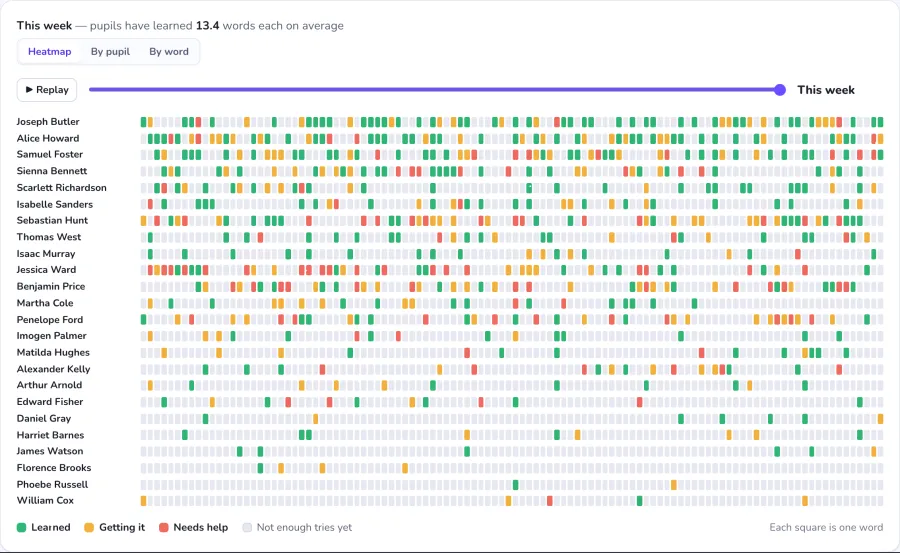
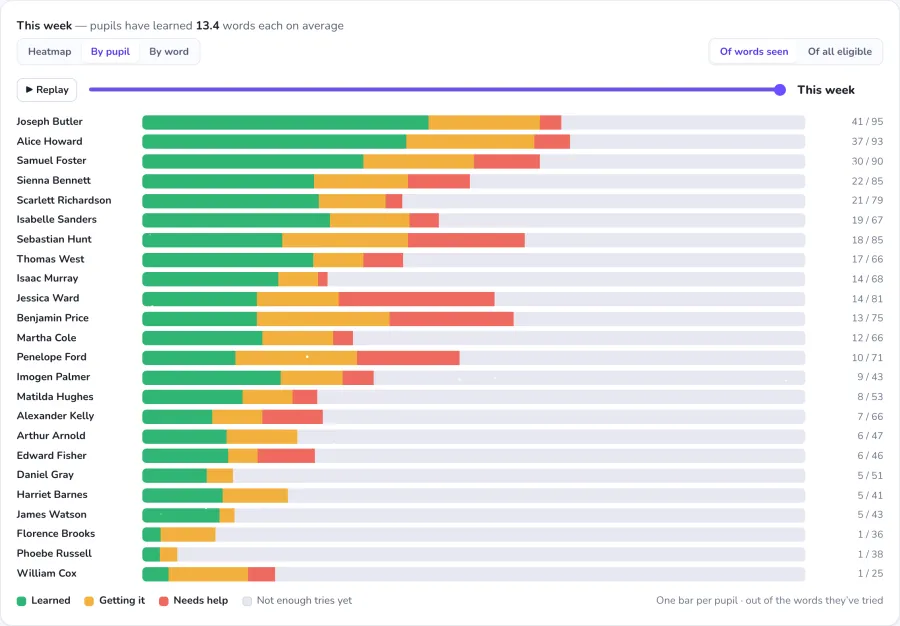
See who practised this week, which words your class keeps getting wrong, and how each child is doing, as a heatmap, not a spreadsheet. The words a child keeps missing come back more often, until they stick. Nothing to set, nothing to mark.
“We have really enjoyed SpellCast. The reward system, where children hatch eggs and care for their creatures, is a massive hit and keeps them genuinely motivated to practise.
From a leadership and teaching perspective, it delivers exactly what we need with very little management required.
It covers the statutory word lists systematically, while tailoring the variety of practice to each child’s individual needs. Crucially, the data is simple for staff to read and monitor, making it easy to see exactly where to step in with extra support.”
No names. No class lists. No worries.
Because you never upload a class list and we never collect pupils’ names, there’s no personal data to risk and, for most schools, nothing to put in front of your DPO before you begin. You tell us a number, not a register, and we create that many anonymous Hero logins. You print the cards and write each child’s name on their own, and that link stays on paper, in your classroom.
Checking the small print? Read our privacy policy (opens in a new tab) (you keep your place here).

Common questions
Do I have to run the test in the app?
No. The weekly test is opt-in: tick “Run a weekly test” when you want it, and leave it off when you don’t. If you’d rather keep testing on paper, you can. Type each child’s marks in afterwards and you’ll still get the scores tracked over time. Either way works.
Which words does the test use?
Last week’s list. You set this week’s spelling list as usual; the in-app test covers the previous week’s words, so children are tested on what they’ve had time to practise. The app reads each word aloud and gives every child a single attempt.
Is it really free?
Yes: the full app, free for your class, with no card and no trial countdown. There’s nothing to cancel. (If your whole school later wants admin dashboards and shared reporting, that’s our paid School plan, but you don’t need it to use SpellCast with your class.)
Why don’t you ask for my pupils’ names?
We take children’s data seriously. Because you never upload a class list, we never hold your pupils’ personal data. Instead of names we create anonymous nicknames; you hold the only list that links a nickname to a real child, locally, in school.
Can other teachers at my school see my class?
No. Your class is private to you. Signing up doesn’t create a school-wide admin or expose your pupils to anyone else. And the good news: other teachers at your school can sign their own classes up free in exactly the same way, and they’ll only ever see their own.
What if a child forgets their password?
You can reprint the cards any time from your dashboard. The login is a nickname username and a short password, designed to be typable by young children on a tablet.
How long does setup take?
About two minutes: tell us your class size, we create the logins, you print the cards. Nothing to install.
Free for your class. Ready in minutes.
No card, no names, nothing to cancel. Sign your class up and print their logins today.